
- Posts: 252
- Thank you received: 0
GPS software options
- lernr
-
 Topic Author
- User
-

Less
More
14 years 11 months ago #200889
by lernr
GPS software options was created by lernr
Acquiring a gps, people face the big question: What's the best software?
I just got the Garmin map60, and already wrangling with the options
Any other ideas, pros / cons and advice?
Cheers
Ivo
I just got the Garmin map60, and already wrangling with the options
- Garmin 24 National Parks West - should be able to use seamlessly with the unit, but seems the accuracy / scale is not there?
- NG Toto! WA - the standard, Ron and others use it, but can't upload the map, just waypoints; heard that it's proprietary file format
- Topofusion: can only get Basic to download topos so far, not much luck with Pro - but a standard file format is used, and should be able to upload maps to my Garmin.
Any other ideas, pros / cons and advice?
Cheers
Ivo
Please Log in or Create an account to join the conversation.
- Koda
-
- User
-
Less
More
- Posts: 166
- Thank you received: 0
14 years 11 months ago #200898
by Koda
Replied by Koda on topic Re: GPS software options
My only advice is to save all GPS trip data you collect with your Garmin (tracks, Waypoints, routes) as a single GPX file type.
The complete GPX file can be imported into TOPO, but only the waypoints can be exported as a GPX file. I don't know about other software. Your comments about TOPO are correct. I think most mapping software utilities can import GPX files and display your tracks, waypoints on a topo map. After spending the money on NG TOPO (for both Ore and WA) and not being able to do what I want with MY files I've been quite frustrated so....
If your a windows user, use a free program called EasyGPS. It really is easy to use, and saves everything as it is.... waypoints, tracks, routes. you can even edit the file to clean it up. You can use this to import and export the GPX data back and forth all you want. It is not a mapping tool however.
If your a non windows user, use GPSBabel. Does the same as above and more but... GPSBabel is not easy to use and is designed to run from a Linux command line, something I'm not good with. If you don't know how to run a program thru the command line (like me) you will need to install a GPSBabel GUI called "Gebabbel"... also free. This is what I use, not super friendly but I figured it out (I have a rough cheat sheet if you need it). Anyways... between these two programs, you can import, export and save all GPS data (waypoints, tracks, routes) as is in one GPX file type. Only then will you have freedom to do with what you want with the data you collect with your GPS device in the field.
Other options: 1) Hillmap is a browser utility that you can create a route and waypoints and save as a GPX file, free... I think the developer may include a GPX upload options soon! 2) GPSVisualizer is another browser utility that lets you create and export routes, and also lets you upload your GPX file for display on a TOPO map... but I have not figured out how to save that latter part for use... not user friendly. 3)GPSies website lets you upload your GPX file, puts it on a google map and lets you share that with friends via email. here is an example of a hike I did... Angels Rest
After the cost of TOPO, I'm not encouraged to buy more expensive proprietary software (Like Garmin Map source...) only to get burned. TOPOfusion looks promising, but have not tried it yet. Regardless, if I cant upload tracks routes to my GPS I don't want it. Only the GPX file can do that. I use browser utilities to create routes, use GPSBabel to upload, go play in the woods and collect more GPS data, download via GPSBabel as GPX... import into TOPO to view on a map. Use EasyGPS on a windows machine if I need to edit anything.... its friggin complicated all because the $200 I spent on TOPO will not let me do all that.
I'd consider buying other software only if I know it will give me the freedom to do what I need with MY gps data. If you find the best software to use, please let me know. NG topo is not it.
The complete GPX file can be imported into TOPO, but only the waypoints can be exported as a GPX file. I don't know about other software. Your comments about TOPO are correct. I think most mapping software utilities can import GPX files and display your tracks, waypoints on a topo map. After spending the money on NG TOPO (for both Ore and WA) and not being able to do what I want with MY files I've been quite frustrated so....
If your a windows user, use a free program called EasyGPS. It really is easy to use, and saves everything as it is.... waypoints, tracks, routes. you can even edit the file to clean it up. You can use this to import and export the GPX data back and forth all you want. It is not a mapping tool however.
If your a non windows user, use GPSBabel. Does the same as above and more but... GPSBabel is not easy to use and is designed to run from a Linux command line, something I'm not good with. If you don't know how to run a program thru the command line (like me) you will need to install a GPSBabel GUI called "Gebabbel"... also free. This is what I use, not super friendly but I figured it out (I have a rough cheat sheet if you need it). Anyways... between these two programs, you can import, export and save all GPS data (waypoints, tracks, routes) as is in one GPX file type. Only then will you have freedom to do with what you want with the data you collect with your GPS device in the field.
Other options: 1) Hillmap is a browser utility that you can create a route and waypoints and save as a GPX file, free... I think the developer may include a GPX upload options soon! 2) GPSVisualizer is another browser utility that lets you create and export routes, and also lets you upload your GPX file for display on a TOPO map... but I have not figured out how to save that latter part for use... not user friendly. 3)GPSies website lets you upload your GPX file, puts it on a google map and lets you share that with friends via email. here is an example of a hike I did... Angels Rest
After the cost of TOPO, I'm not encouraged to buy more expensive proprietary software (Like Garmin Map source...) only to get burned. TOPOfusion looks promising, but have not tried it yet. Regardless, if I cant upload tracks routes to my GPS I don't want it. Only the GPX file can do that. I use browser utilities to create routes, use GPSBabel to upload, go play in the woods and collect more GPS data, download via GPSBabel as GPX... import into TOPO to view on a map. Use EasyGPS on a windows machine if I need to edit anything.... its friggin complicated all because the $200 I spent on TOPO will not let me do all that.
I'd consider buying other software only if I know it will give me the freedom to do what I need with MY gps data. If you find the best software to use, please let me know. NG topo is not it.
Please Log in or Create an account to join the conversation.
- TomK
-
- User
-
Less
More
- Posts: 116
- Thank you received: 0
14 years 11 months ago #200899
by TomK
Replied by TomK on topic Re: GPS software options
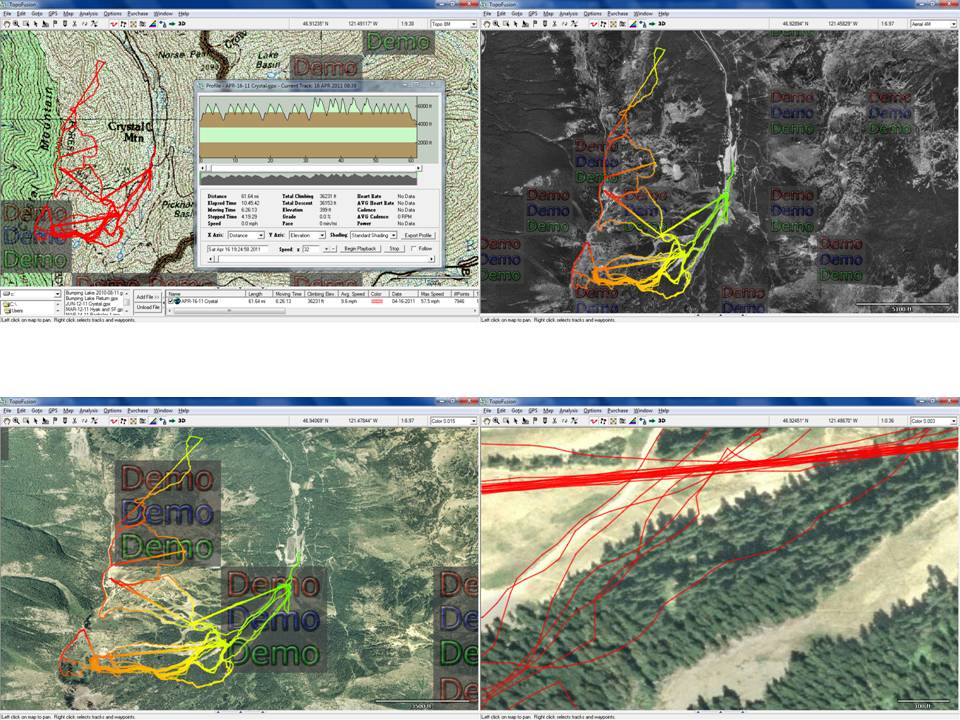
I use the free version of Topofusion. Like it so far, and seriously considering paying to get rid of the "DEMO" blocks.
An example from Crystal a few weeks ago.
An example from Crystal a few weeks ago.
Please Log in or Create an account to join the conversation.
- lernr
-
Topic Author
- User
-
Less
More
- Posts: 252
- Thank you received: 0
14 years 11 months ago #200907
by lernr
Replied by lernr on topic Re: GPS software options
I am also considering TopoFusion, expect better maps than Garmin's, based on what Garmin map reviewers are saying.
Does anyone know if NG TOPO maps are better (resolution and colours, easy to read, well marked features) than whatever TopoFusion downloads from (I think it's myTOPO)?
I already have Garmin's MapSource and BaseCamp, and also Garmin's Naitonal Parks West 24K and the West 24K dvd (like 2x the size of NParks). It took almost a whole day to transfer the West 24K to my micro SD card, no kidding. I know it's over 3 gigs, but still...
I will create and load some routes, go play, and check what I come back with. There is an option to log all tracks to the SD card in a gpx file, should be useful. I also need to decide if the National Parks or the bigger West has the better Garmin maps, but this will be limited to spot checks...
Maybe I'm spending too much time on this, as long as I can upload waypoints that I create pre-trip, and create additional waypoints on the go, this should be good backup for an actual map...
Cheers
Ivo
Does anyone know if NG TOPO maps are better (resolution and colours, easy to read, well marked features) than whatever TopoFusion downloads from (I think it's myTOPO)?
I already have Garmin's MapSource and BaseCamp, and also Garmin's Naitonal Parks West 24K and the West 24K dvd (like 2x the size of NParks). It took almost a whole day to transfer the West 24K to my micro SD card, no kidding. I know it's over 3 gigs, but still...
I will create and load some routes, go play, and check what I come back with. There is an option to log all tracks to the SD card in a gpx file, should be useful. I also need to decide if the National Parks or the bigger West has the better Garmin maps, but this will be limited to spot checks...
Maybe I'm spending too much time on this, as long as I can upload waypoints that I create pre-trip, and create additional waypoints on the go, this should be good backup for an actual map...
Cheers
Ivo
Please Log in or Create an account to join the conversation.
- Koda
-
- User
-
Less
More
- Posts: 166
- Thank you received: 0
14 years 11 months ago #200909
by Koda
Replied by Koda on topic Re: GPS software options
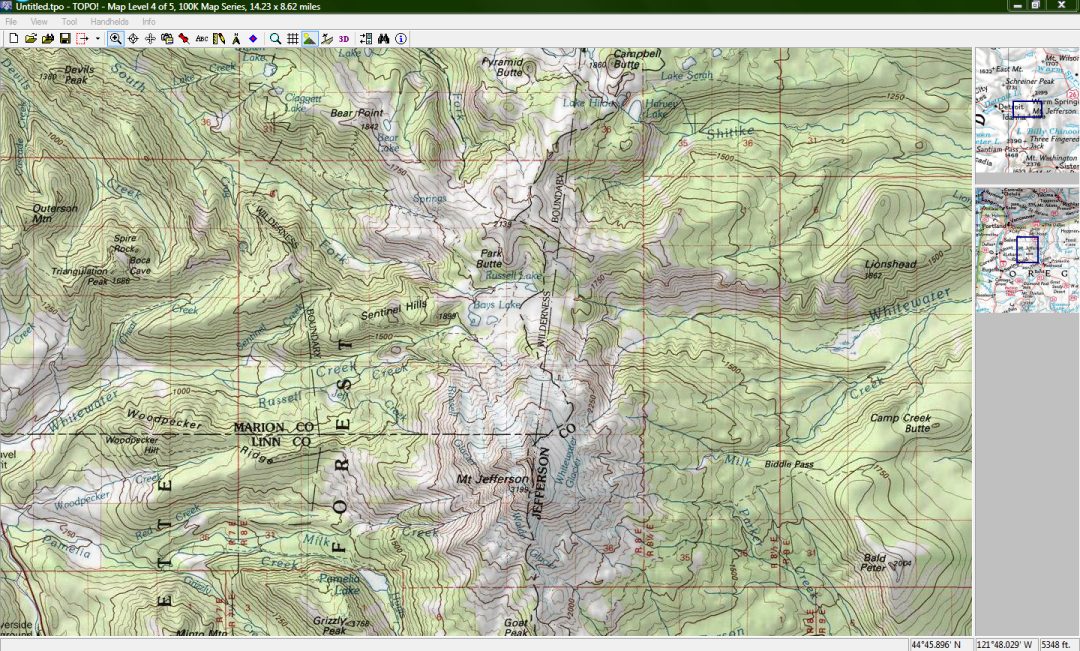
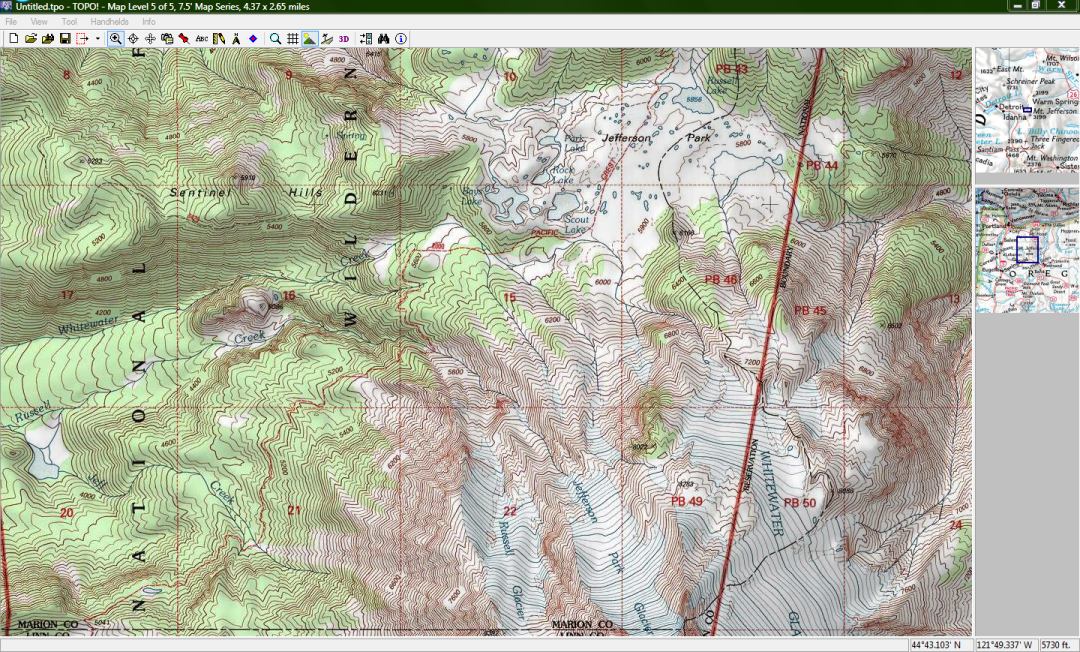
here are some screenshots of NG TOPO. It seems comparable to Topofusion.
Please Log in or Create an account to join the conversation.
- sprice
-
- User
-
Less
More
- Posts: 66
- Thank you received: 0
14 years 11 months ago #200922
by sprice
Replied by sprice on topic Re: GPS software options
I really like these folk's base topo map for washington.
abovethetimber.com/index.php?option=com_...ut=category&Itemid=9
abovethetimber.com/index.php?option=com_...ut=category&Itemid=9
Please Log in or Create an account to join the conversation.