
- Posts: 27
- Thank you received: 0
Home > Forum > Categories > Site Feedback > Trip Report page weirdly maintains other users' search terms?
Trip Report page weirdly maintains other users' search terms?
- mfonda
-

- User
-

Less
More
5 years 7 months ago #234242
by mfonda
Replied by mfonda on topic Trip Report page weirdly maintains other users' search terms?
Hi Pavel,
I ran into this issue again toady (previously happened to me about a week ago). I loaded up turns-all-year.com/trip-reports (not logged in, Chrome/MacOS) and the attached screenshot is what loaded.
I then loaded turns-all-year.com/trip-reports in a new incognito window, same result.
In both cases, refreshing the page did not fix it, but oddly enough, clicking the Trip Reports link in the Home > Trip Reports breadcrumb did. In all cases I've encountered this issue, it appears to be the title of a specific TR that appears in the breadcrumb (as opposed to search term).
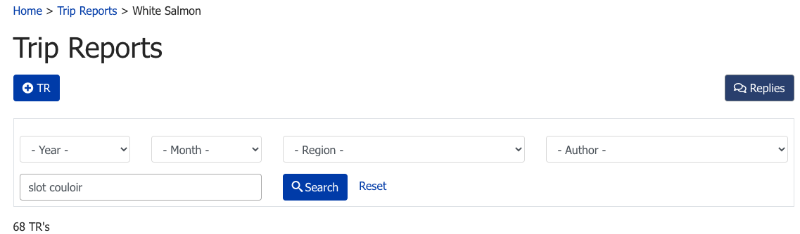
Perhaps also worth noting, when doing a search (e.g. searched for "slot couloir" in the search box, which took me to the URL turns-all-year.com/trip-reports?tr_year_...earch=tr&task=search ), the search appears to have worked as expected, but the breadcrumb shows the title of a recent trip report ("White Salmon"). See second screenshot. The "White Salmon" has persisted for me across multiple browsers and devices (Firefox, Chrome incognito, Safari on MacOS, Firefox on iOS).
Whatever the issue may be, I suspect it is a server-side issue.
Hope this helps!
I ran into this issue again toady (previously happened to me about a week ago). I loaded up turns-all-year.com/trip-reports (not logged in, Chrome/MacOS) and the attached screenshot is what loaded.
I then loaded turns-all-year.com/trip-reports in a new incognito window, same result.
In both cases, refreshing the page did not fix it, but oddly enough, clicking the Trip Reports link in the Home > Trip Reports breadcrumb did. In all cases I've encountered this issue, it appears to be the title of a specific TR that appears in the breadcrumb (as opposed to search term).
Perhaps also worth noting, when doing a search (e.g. searched for "slot couloir" in the search box, which took me to the URL turns-all-year.com/trip-reports?tr_year_...earch=tr&task=search ), the search appears to have worked as expected, but the breadcrumb shows the title of a recent trip report ("White Salmon"). See second screenshot. The "White Salmon" has persisted for me across multiple browsers and devices (Firefox, Chrome incognito, Safari on MacOS, Firefox on iOS).
Whatever the issue may be, I suspect it is a server-side issue.
Hope this helps!

Please Log in or Create an account to join the conversation.
- kamtron
-

- User
-
Less
More
- Posts: 273
- Thank you received: 8
5 years 7 months ago - 5 years 7 months ago #234243
by kamtron
Replied by kamtron on topic Trip Report page weirdly maintains other users' search terms?
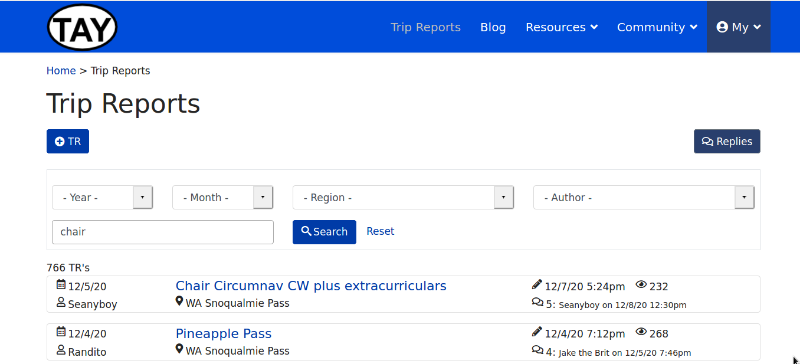
Just had this happen to me again. Address bar just shows trip-reports, no search terms.
Also, copy-pasting this image (ctrl-v) in the message looked fine, but turned into garbage once I submitted the post. Had to edit and use the "attachment" feature.
Also, copy-pasting this image (ctrl-v) in the message looked fine, but turned into garbage once I submitted the post. Had to edit and use the "attachment" feature.
Last edit: 5 years 7 months ago by kamtron. Reason: fixing garbled image
Please Log in or Create an account to join the conversation.
- MtnPavlas
-

- Admin
-

Less
More
- Posts: 98
- Thank you received: 9
5 years 7 months ago - 5 years 7 months ago #234244
by MtnPavlas
Replied by MtnPavlas on topic Trip Report page weirdly maintains other users' search terms?
Thanks, all, for the help with narrowing down the root cause. It seems it was related to the persistent search functionality (where if you search for something on the TR's page, and set up your filters just right, then go to one of the TR's, then come back ... the idea was your previous search/filters would be preserved so you don't have to repeat it again and again as you go in and out of TR's).
This was turned on for both the logged in users and guests. I turned it off for guests, and it seems to work better now (at least, I cannot reproduce it on my end any more). However, the persistent search doesn't seem to work properly for logged-in users (will put it on the bug fix list : )
The other thing was cached breadcrumbs - I turned caching off for that, and it now works well on my end, too.
Anyway - please do report if you see anything funky still. Thanks!
This was turned on for both the logged in users and guests. I turned it off for guests, and it seems to work better now (at least, I cannot reproduce it on my end any more). However, the persistent search doesn't seem to work properly for logged-in users (will put it on the bug fix list : )
The other thing was cached breadcrumbs - I turned caching off for that, and it now works well on my end, too.
Anyway - please do report if you see anything funky still. Thanks!
Last edit: 5 years 7 months ago by MtnPavlas.
Please Log in or Create an account to join the conversation.